


Not necessarily. Making a pay stub and running payroll are two different jobs, even though it’s easy to assume the first requires the second.
The real question is where your payroll numbers are actually coming from.
Say an employee’s wages, deductions, and taxes have already been worked out. In that case, what’s left is mostly a formatting job turning numbers you already have into a clean, readable statement. A pay stub template or an online paystub generator is usually enough for that.
On the other hand, if you’re still calculating wages, processing payments, keeping employee records, and managing payroll on an ongoing basis, you’re dealing with something much bigger than a single document.
Knowing which of these applies to you makes everything else a lot easier to figure out.
Start With the Numbers, Not the Document
A pay stub is really just a record of what someone earned during a specific pay period. Getting that right starts before you ever open a template: you need accurate numbers for what was earned and what came out of it.
Depending on the situation, that typically includes:
- Employee and employer information
- Pay period and pay date
- Pay rate and hours worked
- Regular and overtime earnings
- Gross pay
- Taxes and other withholdings
- Additional deductions
- Net pay
- Year-to-date totals
Worth remembering: the pay stub documents these numbers; it doesn’t correct them. If an employee’s hours or pay rate were wrong to begin with, putting that number in a polished-looking document doesn’t make it right. Check the figures against your payroll records before anything goes out.
Creating the Document Is a Smaller, Separate Task
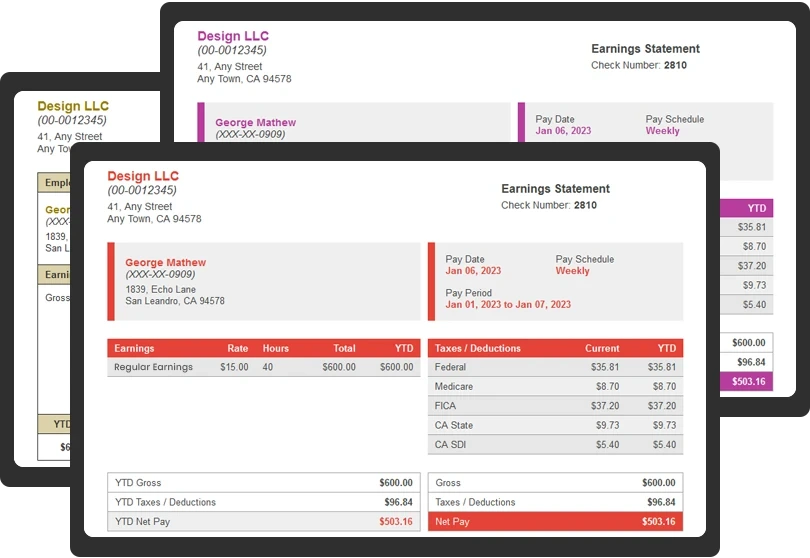
Once the numbers are settled, actually producing the pay stub is the easy part. Most people handle it in two ways.
Pay stub templates give you a consistent layout to work from, and you stay fully in control you can see exactly what’s being entered and adjust to it yourself. The tradeoff is that a template won’t catch your mistakes for you. You’re still responsible for calculating or verifying every figure, keeping it consistent with your records, and including whatever your situation requires.
Online paystub generator is built specifically for this. You enter the employee, employer, pay period, earnings, and deduction details, and it produces the finished statement. For example, SecurePayStubs is one option for generating the finished pay stub once those figures are ready.
That tends to give you a more consistent result than a manual template, which matters if you’re doing this regularly. Just don’t treat a generator as a stand-in for actual payroll processing.
Where Payroll Software Actually Earns Its Place
Payroll software becomes the right call once the pay stub is just one small piece of a much bigger workflow. A payroll system typically handles things like:
- Calculating employee wages
- Running payroll on a recurring schedule
- Handling tax withholding
- Processing employee payments
- Maintaining payroll records
- Managing deductions and benefits
- Payroll reporting
- Tax filing and related compliance work
Put simply, payroll software is built around the whole payroll process, while a paystub generator is built around a single document inside that process. If your numbers are already sorted and all you need is a statement, a document tool is plenty. If you need to manage the full cycle — hours, withholding, records, all of it a generator on its own won’t get you there.
It Usually Comes Down to One of Three Situations
There’s no single right answer here. It depends on where you’re starting from.
You already have the numbers. Wages, deductions, taxes, and net pay are all calculated, so the remaining job is just documentation. A template or generator should cover it.
You still need to calculate and run payroll. Starting from raw hours and pay rates, and still mustwork out withholding, process payments, and keep records? That’s a bigger job than a document tool was built for, and it’s where payroll software is worth the investment.
You already use payroll software but still need to pay stubs on your own. These don’t have to be either/or. Plenty of businesses run payroll through one system and still need a separate way to generate, format, or reissue individual pay stubs. What makes sense depends on how your payroll already works and what you actually need the documents to do.
The better question isn’t which type of tool is universally best. It’s which part of the process you actually need help with.
Check It Before It Goes Out
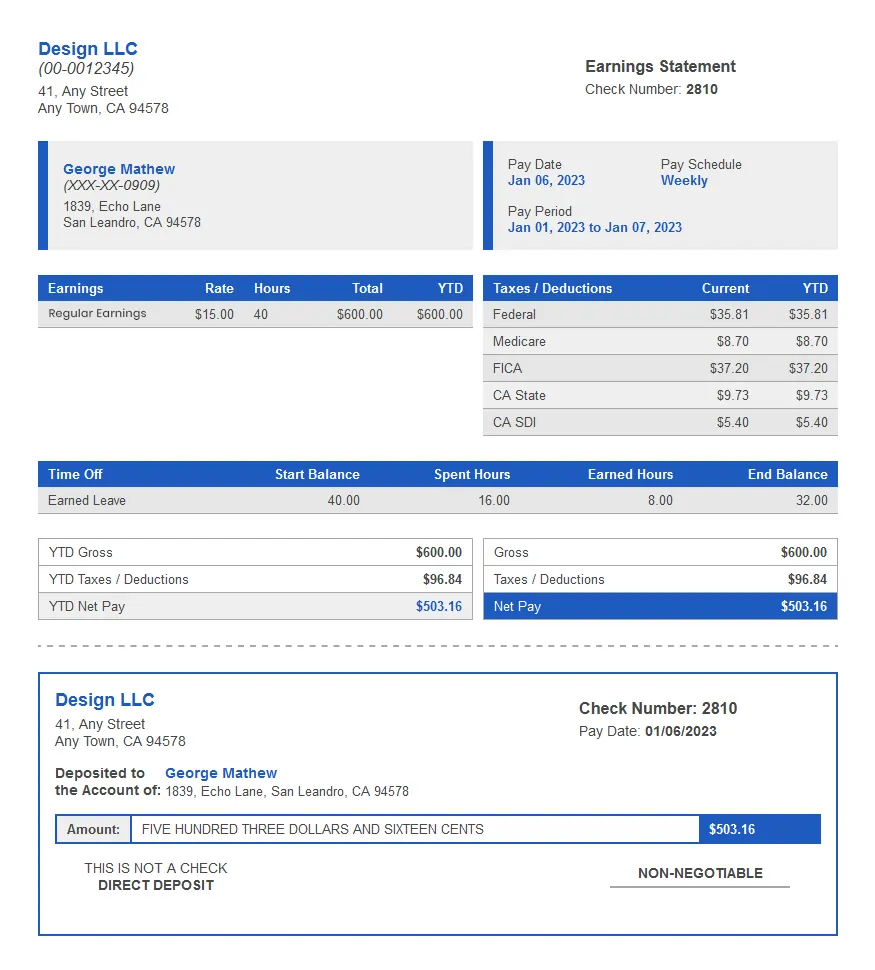
Whichever way you create it, a pay stub should get checked against your actual payroll records before an employee ever sees it. A quick look can catch small mistakes that turn into real problems later:
✓ Is the employee’s name and information correct?
✓ Does the pay period match your records?
✓ Are the hours and pay rates accurate?
✓ Does gross pay match your earnings calculation?
✓ Are taxes and deductions entered correctly?
✓ Does net pay reconcile with everything else?
✓ Are the year-to-date totals consistent?
✓ Does the document include what is required for your jurisdiction?
This matters no matter which method you use. A template could carry a typo just as easily as a generator could output the wrong number if you entered the wrong information or used the wrong settings. The tool makes the document easier to produce — it doesn’t remove the need to check it.
One Format Won’t Cover Every State
Pay stub requirements aren’t the same from state to state. Some states require specific information on every wage statement, and rules about timing and recordkeeping vary too. So don’t assume a generic format automatically checks every legal box.
If you have employees working in more than one state, it’s worth looking into what applies to each of them.
The software or template you use is only part of the picture. As the employer, you’re still the one responsible for making sure what employees receive is accurate and meets whatever’s required.
What If You’re Self-Employed?
If you work for yourself and need to show proof of income, hold off on making a pay stub. First, find out what the lender, landlord, or organization will accept. Many are fine with tax returns, 1099s, bank statements, invoices, or a profit-and-loss statement.
Once you know what they want, send the documents that best show what you really earn. If they’re okay with a generated income statement, just make sure every figure matches your records.
So, Do You Need Payroll Software?
Start with what you actually need to get done. If your payroll numbers are already worked out and you only need to turn them into pay stubs, a template or an online pay stub generator may be all you need.
But if you’re doing the whole thing — calculating wages, handling deductions, paying people, and recordkeeping — payroll software is the better option. And if you already have payroll software, it’s perfectly fine to use a separate tool just for the pay stubs.
Key Takeaway
You don’t need a full payroll system just because you need a pay stub. If your numbers are already settled, an online generator can handle the document without adding a whole new system to your workflow.
SecurePayStubs makes it easy to create professional pay stubs from the payroll information you already have, so you get the documents you need without complicating the rest of your process. Ready to create one? Start with SecurePayStubs.